
Black Friday can be a valuable revenue opportunity for aesthetic clinics, but an offer can quickly erode your margins if it is not planned properly.
Start with the outcome you want: attract the right patients, increase appropriate bookings and encourage repeat business. A discount is only one part of the plan. The offer, audience, timing and follow-up need to work together, with a clear goal and enough margin to make the campaign worthwhile.
You may already use DappleOS for bookings, patient records and payments. Its patient segments, email and SMS broadcasts, scheduled sends, promo codes and automations can help you put that campaign into practice.
Black Friday can also introduce patients to something they have not used before: shopping in your clinic’s branded patient app, buying a package or joining a membership with a savings wallet. Use the campaign to build familiarity and give patients convenient ways to buy and book after the weekend ends.
Key dates for 2026
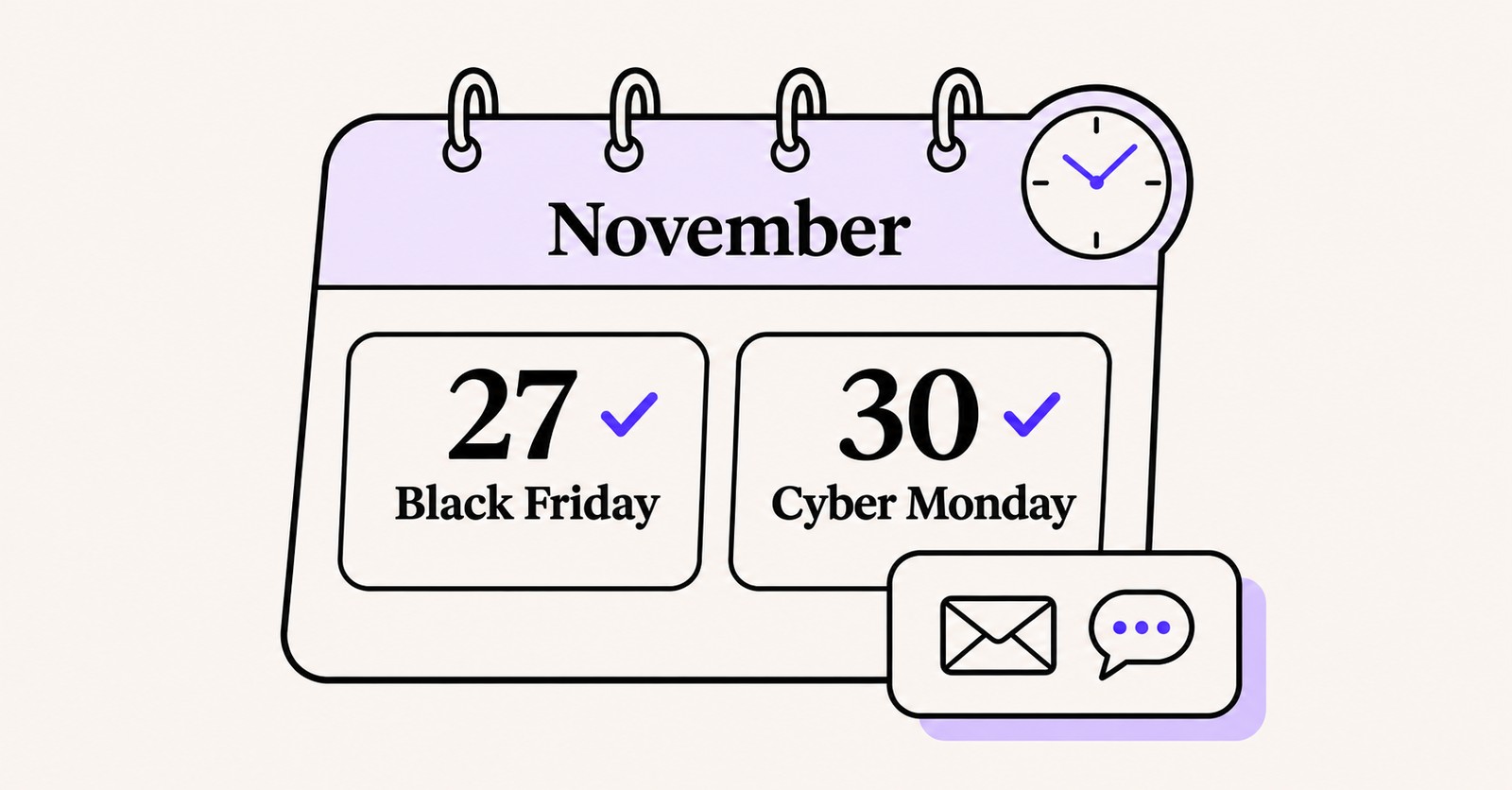
- Black Friday: Friday 27 November 2026.
- Cyber Monday: Monday 30 November 2026.
Choose whether your offer runs for one day or continues until Cyber Monday. State the actual opening and closing time, including the time zone, in your offer and messages.
Find the opportunity before choosing the offer
Start with what your patients already buy and what your clinic wants to improve. Reporting and the Insights Agent can help you find a useful starting point for a relevant offer.
- Check skincare’s share of revenue. Review Skincare % of revenue alongside skincare sales and total sales. Compare the same locations and reporting periods, and check the report’s tax basis. Confirm which products count as skincare in Settings → General → Reporting before interpreting the result. A small share can prompt investigation; it does not mean every patient needs more products.
- Find replenishment opportunities. Review patients’ last purchases of the selected products. For products recorded in treatment plans, reporting can compare the last recorded purchase with the product’s configured repurchase interval. Treat this as a possible replenishment prompt, not proof that the patient has run out.
- Look for purchases from only part of a range. Ask for a patient-by-product purchase breakdown for a named cosmetic skincare range and a defined period. Review it against the products in that range to identify relevant complementary options. No recorded purchase does not prove a patient lacks that product or needs the entire range.
- Understand the audience before crafting the offer. Compare recent and returning retail buyers, popular products, spend and purchase dates. Use the pattern to decide whether a replenishment reminder, a carefully selected product pairing or an introduction to app shopping is most useful.
Questions to try with the Insights Agent, where enabled:
“What percentage of our revenue came from skincare last month? Show the skincare amount, total and comparison with the previous month, using the same locations and tax basis.”
“Which patients have a skincare product in their treatment plan whose configured repurchase interval has elapsed since their last recorded purchase? Show the product and purchase date.”
“For this cosmetic skincare range, show the products each patient bought in the last six months and their latest purchase dates, so we can review who bought only part of the range.”
“What do our skincare purchase patterns over the last six months tell us about repeat buyers, popular products and potential audiences for a retail offer?”
Turn the finding into a campaign: review the result and its filters, choose one relevant patient group, then create or refresh the segment. Check consent, recent purchases, suitability, stock and margin before matching that group to an offer and promotion code. Use AI to investigate the data; your team decides what to offer and who should receive it.
Choose an offer that fits your clinic
Choose one main offer and one clear next step. Check your stock, margin, capacity and the exact products or services included before writing the message.
Here are starting ideas for different clinic offerings:
- Cosmetic skincare: create a selected cleanser-and-moisturiser offer with a product-specific discount code. Email explains the selection; SMS links to the shop.
- Repeat retail purchases: send a relevant replenishment offer to patients who already buy those products, with an easy route to reorder.
- Genuine non-clinical beauty services: consider a clearly defined package after checking the actual service and provider. Explain the inclusions and redemption terms.
- Optional service extras: offer a suitable non-clinical add-on alongside selected bookings during the campaign, with clear pricing and a planned switch-off time.
- Memberships: introduce an existing membership and explain its benefits, including a savings wallet where offered. Give patients a clear online joining path.
- Gift cards: focus on convenient gifting, personal messages and scheduled recipient delivery. Assess any bonus-value promotion against its redemption terms.
- Cosmetic procedures: use balanced information about assessment, suitability and existing care pathways. Review any discount or incentive for the exact procedure and practitioner before advertising it.
Check product classification too. A cosmetic cleanser is not interchangeable with a prescription product or therapeutic sunscreen; ingredients, claims and presentation affect the rules that apply. TGA guidance on cosmetics and therapeutic goods.
Keep clinical decisions separate from the promotion. TGA restrictions cover direct and indirect advertising of prescription medicines. Ahpra restricts advertising that encourages unnecessary services, and its non-surgical cosmetic procedure guidance addresses goods or services offered as incentives to seek procedures. Memberships, rewards and gift cards follow the same principle. TGA prescription-medicine advertising guidance, Ahpra advertising guidelines, Ahpra cosmetic procedure guidelines, section 14.
Use segments to send different offers to different patients
Patient segments help you choose who receives each offer. You can give different groups a relevant product selection, message and next step, with a separate promotion code for each retail offer.
Build or curate the groups from your clinic’s records. For example:
- Repeat skincare buyers: send a replenishment email for selected cosmetic products they already buy, followed by a shop link and
SKIN10code by SMS. - Retail customers who have not ordered recently: choose a sensible period for your products and send a welcome-back selection with a separate
RETURN10code. Give them a reason to explore the range again. - A selected loyalty group: offer an appropriate in-clinic retail saving with
RETAILVIP. Use the segment as an eligibility rule on the invoice promotion so staff can check and apply the available offer. - Patients interested in memberships who have not joined: explain the existing benefits and savings wallet, then link to the joining experience. This campaign can introduce value without needing another discount.
These are audience ideas to configure, not assumed ready-made segments. Decide which offer takes priority when someone belongs to more than one group, so they do not receive competing messages.
Start here: create one segment, one email broadcast and one SMS broadcast for each chosen offer. Review the members and marketing consent, match the message to the correct code and destination, and plan how to exclude purchasers before a follow-up. Segment membership needs refreshing as records change.
Get help setting up a patient segment
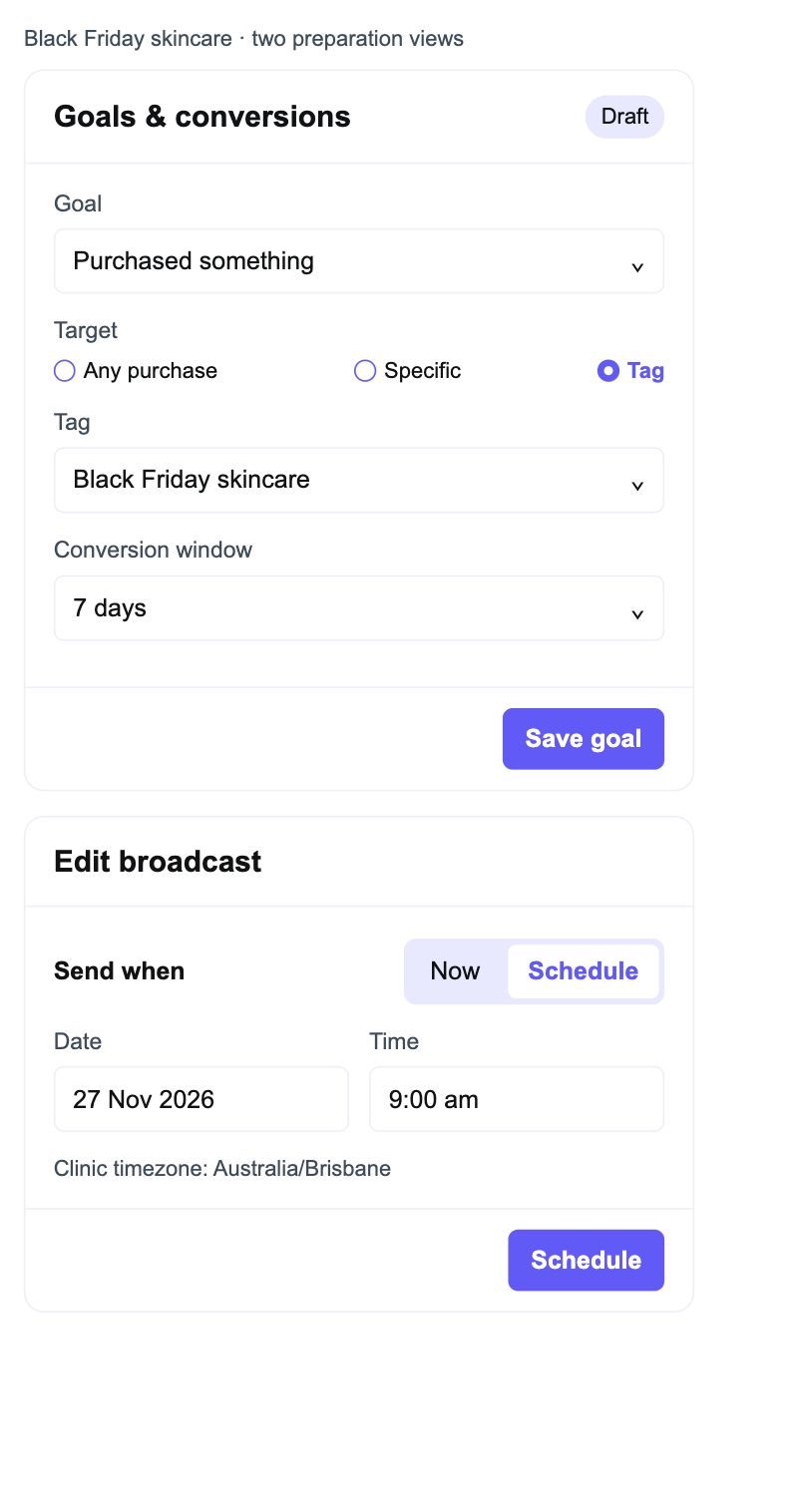
Set a goal on each broadcast before sending
Decide what success means before you write the subject line. For a skincare offer, that might be purchases of the featured products. Setting the goal early gives you something useful to review after the campaign.
In Goals and conversions, where enabled:
- Choose the relevant purchase or booking outcome.
- Select the specific item, an available tag or the broader target that matches the campaign.
- Choose the conversion window, such as seven days for a short retail offer.
- Save the goal before sending, using comparable settings across the email and SMS broadcasts.
Goal changes apply going forward. Set your goal as part of preparation, then keep a commercial target alongside it, such as the number of eligible retail orders you would like to see. Membership sign-ups, gift-card sales and app adoption also need their relevant records reviewed.
Get help setting a broadcast goal
Use email to explain and SMS to prompt
With email and SMS broadcasts, email gives you room to explain the selected products, saving, exclusions, dates and next step. SMS provides a short, timely prompt with a direct link. Together, they can give patients the detail they need and a convenient way to act.
For an illustrative cosmetic-skincare offer, the email could lead with:
The SMS could say:
Start here: prepare separate email and SMS broadcasts for your audience, replace the placeholders with your reviewed offer and send a test to your own email address and mobile. Smart sending selects a channel for each recipient; use separate broadcasts when you want both an email and an SMS in the sequence.
Get help creating email and SMS broadcasts
Plan your stock before you launch
A profitable campaign needs enough stock to meet demand without tying up cash in unnecessary purchases. Use the new Stock Dashboard to turn your offer into a practical stock plan.
- Before launch: review low and critical stock, estimated days of cover, suggested reorder levels and incoming deliveries. Check supplier lead times and review the quantities you need before opening the offer.
- Plan for increased demand: where enabled, use stock forecasting with DappleAI to explore a Black Friday what-if scenario. Review the expected uplift and compare its effect on stock requirements and suggested orders.
- During the campaign: monitor stock levels and overdue deliveries, review configured daily summaries and separate critical-stock alerts, and adjust offers or reminders if availability changes.
Forecasts use your clinic’s records and the assumptions you review, so an expected promotional uplift remains an estimate. Review suggested orders before placing them.
Start here: choose the products in your offer, check their stock records and reorder levels, and assign someone to monitor availability throughout the campaign.
Schedule the campaign before the busy weekend
Scheduling broadcasts gives your team time to review the copy, test checkout and prepare for enquiries. It also removes the need to assemble messages between appointments on launch day.
Work backwards from the offer’s opening and closing dates. Agree who owns the campaign and who will monitor replies and orders once it starts.
| Date | What to prepare or send |
|---|---|
| By Friday 13 November | Choose the goal, offer, stock, margin, audience, budget and campaign owner. |
| 16–20 November | Configure codes and eligible purchase paths, prepare messages, save broadcast goals and test the full journey. Schedule sends once the review is complete. |
| 23–26 November | Send an introductory email if useful. Explain the selection and exact offer dates; do not imply the saving is already available. |
| Friday 27 November: Black Friday | Open the offer at the agreed time. Send the launch SMS with its matching code and purchase link. Enable any staff-managed temporary add-ons or rewards changes. |
| 28–29 November | Monitor stock, enquiries and purchases. Send a useful follow-up only to the appropriate audience. |
| Monday 30 November: Cyber Monday | If the offer genuinely continues until Monday, send an optional final reminder to eligible non-purchasers before its stated closing time. |
| At the advertised closing time | Confirm codes and gift-card promotions have ended, switch off temporary add-ons, restore any temporary reward rates and stop remaining promotional reminders. |
| From Tuesday 1 December | Reconcile purchases, refunds and messaging costs. Make the final assessment after each broadcast’s conversion window has finished. |
Choose the cadence for your audience. Every message should have a purpose. Not every patient needs every message.
Start here: name each broadcast clearly, choose its send date and time, and check the clinic’s configured time zone. DappleOS supports scheduled sends from five minutes to 30 days ahead. Align the first purchase message with the promo code’s start time.
Check the final links on a phone. Longer messages can be split into multiple SMS parts, with each part counted as a separate SMS for billing. For example, a three-part message sent to one patient counts as three SMS messages. Review the estimated SMS count and cost before scheduling; personalisation can change the final message length.
Close the campaign deliberately: assign the closing checklist above to one team member. Stop offers and promotional reminders at the advertised time, while keeping fulfilment, recipient gift-card delivery and appropriate post-purchase support running.
Get help scheduling your broadcasts
When to send email and SMS, and how many
There is no single best send time for every clinic. Broader marketing research gives you a starting point; your patients’ habits, previous campaign results and the offer’s opening time should shape the final schedule.
What independent research tells us:
- Email frequency involves a trade-off. A 2026 working paper by researchers at NYU, Boston College and Columbia reports an online-retail experiment in which fewer promotional emails reduced unsubscribes, but also reduced short-term purchases and revenue. This supports reviewing sales and audience retention together, rather than treating more sends as automatically better. It does not establish an ideal frequency for clinics. Read the university research.
- SMS timing depends on the situation. A peer-reviewed study in Management Science found that the most effective lead time for an SMS promotion varied with recipients’ proximity to the promoted event. This was a 2014 mobile-promotion experiment, not an Australian clinic study or a test of the best hour to send. Our practical takeaway is to leave patients enough time to act and test timing with your own audience. Read the SMS field experiment.
- Use your clinic’s results to choose a starting time. For email, test a time when previous messages have led to useful clicks, bookings or purchases. For SMS, choose a considerate local daytime slot when the offer is live and your team can answer questions. The times below are planning examples, not research-proven winning times.
A practical clinic starting plan: for one selected cosmetic-retail offer running until Cyber Monday, plan up to three emails and one or two SMS messages across 24–30 November. This is our suggested campaign structure, not a research-proven optimum. Use fewer messages if patients rarely receive marketing from your clinic, and reserve the optional final SMS for relevant, engaged non-purchasers.
| Example send | Message and purpose |
|---|---|
| Tuesday 24 November, 10 am | Email 1: introduce the offer. Explain the selected products, value, conditions and actual opening date. |
| Friday 27 November, 9 am | SMS 1: the offer is live. Send the matching code and a direct purchase link to the eligible SMS audience. |
| Friday 27 November, 11 am | Email 2: help patients choose. Show the selection, answer common questions and explain how to buy in the app or shop. |
| Monday 30 November, 10 am | Email 3: final-day reminder. Send only if the offer genuinely continues until Monday, to eligible patients who have not purchased. |
| Monday 30 November, 3 pm, optional | SMS 2: a useful final prompt. Use only for engaged non-purchasers, with stock available and enough time to act before the advertised deadline. Omit it if the offer has closed or the extra reminder is unnecessary. |
These example times deliberately separate email and SMS rather than delivering both together. The afternoon final SMS is a practical spacing choice, not a claim that afternoon performs best. For an offer that ends on Black Friday, remove the Monday messages and make every deadline match the actual offer.
Count messages per patient, across the campaign. Include other promotional broadcasts and automation reminders when reviewing that total. Refresh the audience before each reminder, remove purchasers and opt-outs, and reduce sends if unsubscribes or complaints rise. Patients who belong to several segments should not receive every version of the offer.
Check the recipient’s local time. DappleOS schedules broadcasts using the clinic’s configured time zone. For patients in other states or countries, account for their local time and daylight saving when preparing separate audience groups and send times. As a practical courtesy, keep promotional SMS close to local business hours.
Test and learn: if your audience is large enough, use two comparable, non-overlapping groups to test one timing change with the same offer and message. Keep the broadcast goal and conversion window consistent. Review purchases or bookings per recipient, messaging cost, margin and unsubscribes. Use clicks as supporting evidence and avoid choosing a winner on opens alone. Apple’s Mail Privacy Protection can download email content even when the recipient has not engaged with the message, so an apparent open is not reliable evidence of interest. Treat small samples as directional. Apple explains Mail Privacy Protection.
Make your branded patient app a commerce engine
If patients already use your branded patient app for bookings, show them what else they can do there. With the relevant features enabled, they can purchase products through eCommerce, buy eligible packages and join available memberships.
A Black Friday message can introduce that convenience. Use email to explain where to find the shop or membership information, then use SMS to provide an easy link. The benefit can continue after the offer ends, when patients know how to shop or manage their next booking between visits.
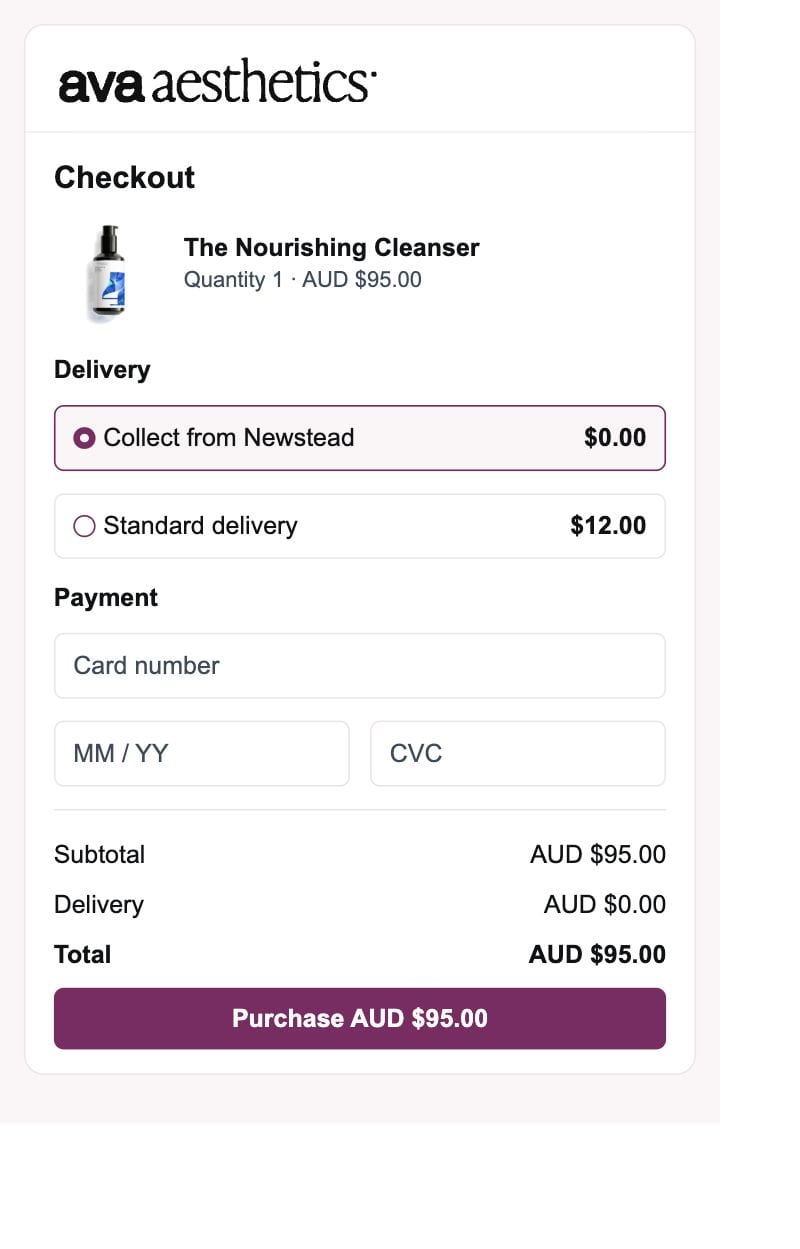
Start here: choose the destination for your campaign and test it as a patient. Check sign-in, the product or plan information and the payment steps. Link to the relevant shopping or joining experience so patients can find what the message promised.
Get help with app shopping and joining
Packages: put clear inclusions into one purchase
Packages bring defined inclusions together, with eligible packages available through the online storefront. They give patients a clear view of what they are buying and give your team a structured way to manage redemption.
For an appropriate non-clinical offer, consider a clearly described service package. A clinical treatment package should support an agreed care plan and suitable intervals; a sale should not become a reason to have additional procedures.
Start here: choose the package, confirm its inclusions, price and redemption terms, then check its online purchase experience. Explain how patients arrange appointments afterwards. Package purchasing and online booking are separate steps with their own setup.
Appointment add-ons: offer a relevant extra during Black Friday
Appointment add-ons let you offer another eligible treatment option alongside a selected booking, online or in clinic. Choose which options belong together and add a short explanation so patients understand the extra before choosing it.
For a clinic offering genuine non-clinical beauty services, one idea is to make a suitable optional service enhancement available with selected bookings during the Black Friday campaign. Review the actual service and provider first. Email can explain the pairing and extra price, while SMS links to the booking experience. Keep the choice optional and make clear whether the deadline applies to making the booking or attending the appointment.
Plan limited-time availability as an opening and closing task: assign someone to enable the offer on the intended online or in-clinic channels at launch, then switch it off when the campaign closes. Add-on rules do not have an automatic campaign start/end date timer. Their day-of-week setting controls the appointment day, so it should not be used as a Black Friday expiry date.
Start here: choose the main service and add-on, check the add-on’s own price and duration, write the offer text and test the booking path. Show pricing consistently with the underlying treatment option; the add-on rule does not create a separate promotional price. Review uptake in Add-on Treatments reporting after the campaign.
Keep clinical pairings based on suitability. Additional products or services must not become an incentive to seek cosmetic procedures, and time-limited offers can encourage unnecessary use of regulated health services. Apply the same advertising review to the add-on as to the main offer. Ahpra advertising requirements.
Get help setting up appointment add-ons
Memberships: introduce a savings wallet
Memberships can offer ongoing benefits such as account credit, package inclusions or reward points. Black Friday gives you a reason to explain an existing membership to patients who may not know about it.
With a savings wallet model, regular membership payments can build clinic account credit for future eligible purchases. Explain how the payment frequency and credit amount help patients plan their spending, then show them how to join through the enabled app or portal experience.
Start here: review the plan’s payments, benefits, credit timing and cancellation terms. Make clear what happens to unused paid credit and any clinic-funded bonus when the membership ends. Give patients that information before they join.
Get help setting up a membership savings wallet
Promotion Management: match codes to offers and eligible patients
Open Promotion Management under Marketing, or Settings → Marketing & Growth. Create a memorable code for each offer, with a percentage or fixed discount, validity dates and usage limits. Product-specific online-shop codes can apply to a selected range, so the advertised skincare saving applies to the products you chose.
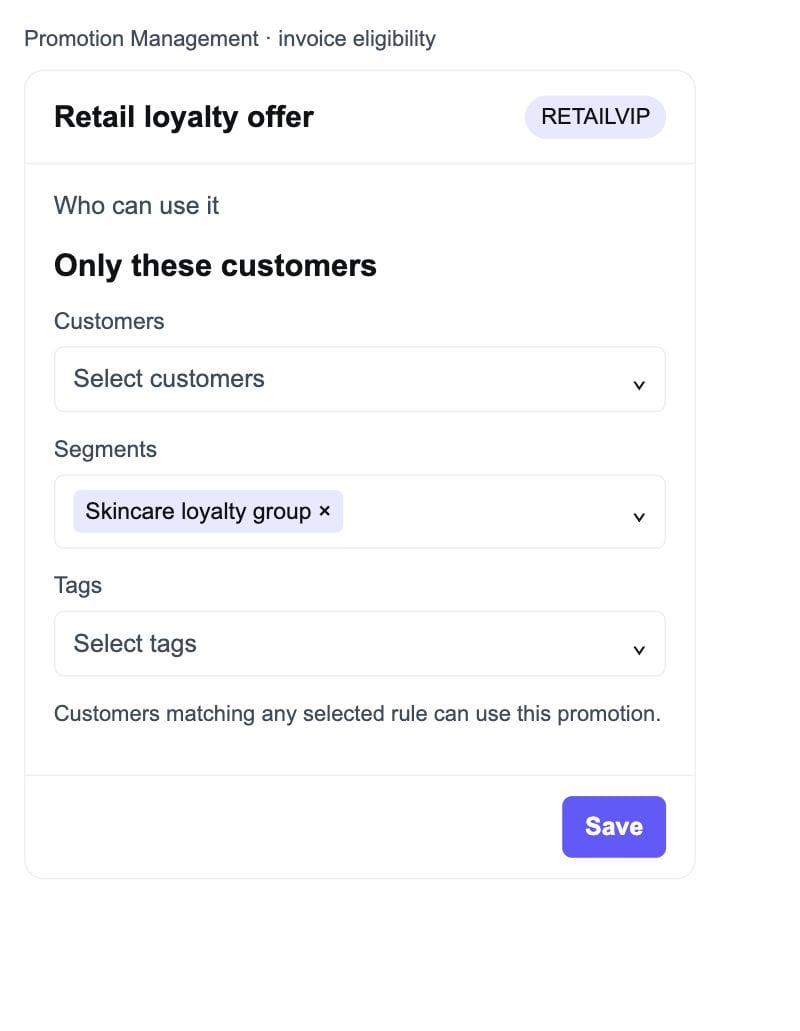
For invoice promotions, the Who can use it settings let you select patients, segments or patient tags. This makes an offer such as RETAILVIP available to the intended group. Staff can review available codes in the patient profile’s Active Promotion Codes section and in the invoice code picker where enabled.
The audience and redemption rules do different jobs. A segment controls who receives a broadcast. Invoice eligibility controls who can use the offer on an invoice. Those segment and tag rules do not restrict online-shop redemption, so a code emailed to one group should not be described as exclusive online. Use the shop’s product, date and usage controls and account for codes being shared.
Start here: create the code, select what it discounts, set its dates and limits, then configure eligibility for an invoice offer. If several eligibility rules are added, matching any one can qualify a patient; use a single combined segment when every audience condition must be met. Test the intended patient and purchase path before sending. Retail codes, gift-card promotion codes and package purchases use different paths.
Equivalent codes such as BFEMAIL and BFSMS can help compare code usage. Treat those as redemption records, since patients may receive both messages or share a code.
Get help setting up promotion codes
Gift cards: make gifting convenient
Gift cards let patients buy a gift, add a personal message and schedule recipient email delivery. That gives your campaign a useful gifting story as the festive season approaches.
DappleOS also supports fixed, percentage and stepped bonus-value promotions. Review where the balance can be redeemed before advertising an uplift; a general gift card should not be described as retail-only unless that restriction has been established and can be honoured.
Start here: check the purchase and recipient-delivery experience, then confirm the card’s conditions. An online gift-card promotion needs a code, including when auto-apply is enabled; auto-apply supplies the code for the purchaser. Keep the promotion’s purchase deadline distinct from the gift card’s redemption and expiry terms.
In Australia, most purchased gift cards must be valid for at least three years from the date they are supplied or purchased. Exceptions include some promotional, discounted and loyalty-program cards, so check the rules for the specific offer before setting an expiry date. ACCC gift-card guidance.
Get help setting up gift cards
Rewards: help patients build useful app habits
Rewards can support an appropriately designed loyalty program. Automation journeys include a Credit reward points action, so you can connect a qualifying action with configured points and a message explaining the benefit.
For app adoption, explore a welcome journey following an app booking or an eCommerce order. The booking trigger can distinguish App from other booking channels where enabled. Its run-once option limits each patient to entering that automation once; it does not identify an existing patient’s first-ever app booking. The First appointment filter matches a patient’s first-ever appointment, and the new eCommerce order trigger needs separate eligibility checks for a first-purchase-only offer.
If you temporarily increase points earned on eligible retail spending, review the earning rules and cost first. The earning rate has no campaign end-date setting: assign someone to restore it at the advertised closing time. Points-expiry settings control unused points, not when a promotional earning rate ends.
Start here: define the qualifying action, check the audience and repeat-award controls, then test the points and message steps. Explain points separately from membership account credit. Rewards tied to cosmetic-procedure bookings still require advertising review; calling the offer “app adoption” does not change what it encourages.
Get help setting up a rewards journey
Follow up according to what the patient does
Automations let you build a follow-up around an action, such as using a promo code. For an appropriate retail offer, a journey can send the email, wait, check redemption and send a reminder down the relevant branch.
Start here: use explicit email and SMS steps, add the wait and check whether the promotion code has been used, then test both branches. End the promotional reminder path for patients who have redeemed the code and keep reminders within the offer period.
The check can use an existing promotion code or a code created in the journey. A patient may also buy without using a code, so account for those purchases in your exclusions. Separate scheduled broadcasts need their own audience review; they do not automatically inherit an automation’s branching rules.
Get help building a follow-up automation
Put it together: a selected-skincare campaign
Here is how to turn the reporting findings into a campaign for selected cosmetic cleansers and moisturisers:
- Find the opportunity and define the offer. Review skincare revenue and purchase patterns, choose relevant products, check stock and margin, and agree the saving, dates and conditions.
- Build the audiences. Separate repeat skincare buyers from retail customers who have not ordered recently. Review consent, recent purchases and overlap between the groups.
- Set up the offers and purchase paths. Use Promotion Management to configure
SKIN10for 10% off the replenishment selection andRETURN10for 10% off the welcome-back selection. Limit each code to its intended products, dates and usage, then test checkout through the patient app or portal. These online codes target different messages and products; they are not exclusive to the emailed segments. - Set the broadcast goals. Choose the appropriate purchase target for each selection and a seven-day conversion window before sending.
- Prepare and schedule the messages. Write an email for each audience and use SMS at launch to share its matching code and shop link. Send tests and review costs first.
- Plan the follow-up. Build a separate automation with a wait and a branch based on promotion-code redemption, or deliberately select and refresh the audience for a scheduled reminder. Account for patients who bought without the code, and avoid overlapping reminders from both approaches.
- Review the outcome. Compare purchases and code usage for each offer with your target, then consider collected payments and refunds, discounts, messaging costs and margin. A purchase made after someone receives a message does not, on its own, prove that the campaign caused the purchase.
This gives you a complete first campaign while introducing more of DappleOS to your team and patients. You can then apply the same planning process to a suitable gift-card, package or membership campaign, using its own purchase path and records.
Keep learning: in Growing a successful clinic, Suzie Hoitink and Luke Fuller discuss skincare follow-up, marketing attribution and the KPIs that help owners understand performance. Listen or watch for more ideas about building repeat business.
Get set up with the Help Agent
Choose one feature to put to work next. You do not need to work out every setting on your own: select the sparkle icon in the DappleOS header and choose Help Agent. Tell it what you want to set up and ask for the steps.
The setup buttons throughout this article open DappleOS and ask the Help Agent a question about that feature. Sign in if prompted, then use the guidance to work through your setup.
Be specific. “How do I schedule an SMS broadcast and set a purchase goal?” is a useful starting question. Follow up with the part you need help understanding, then review and test your campaign before sending.
If you are evaluating DappleOS, book a demo to see how the marketing and commerce workflows fit your clinic.